
Availability
On first use, choose items from the bookmarks bar, Other bookmarks or individual links. If you already use Markora, open Data & recovery → Backup to start an import.
Start with one task
In the first-session guide, choose Open a bookmark or Save the current page. You can start copying now or return later through Add → Import bookmarks on Home.
Select, review, then copy
Nothing is selected by default, and you may skip.
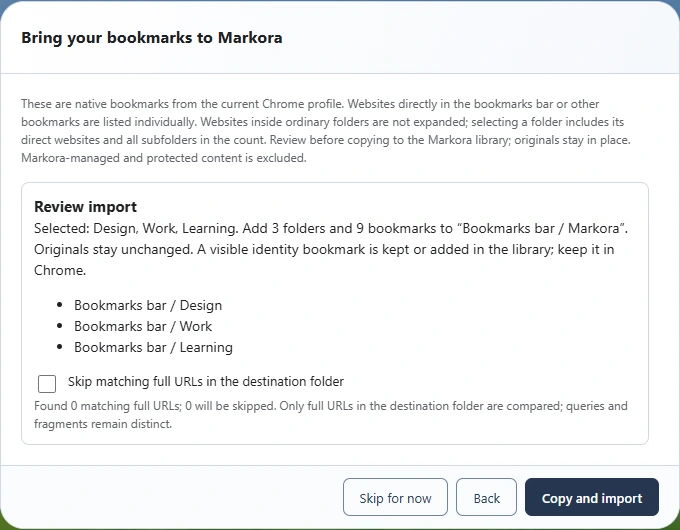
- Select the bookmarks bar, Other bookmarks, ordinary folders or loose websites. A selected parent includes its contents. Select all and Deselect all are available.
- Review names, hierarchy, counts and unsupported URLs that will be skipped.
- Choose Copy and import to copy them into a separate Markora folder.
- Or choose Not now or press Esc. The guide will not keep asking.
Import after skipping the prompt
Open Data & recovery → Backup → Import browser bookmarks. Markora copies user folders and loose websites from native containers such as the bar and Other bookmarks directly into the confirmed library. User folder hierarchy and order remain. Managed, protected and marker-containing branches are excluded. The website demo cannot read real bookmarks.
Resolve matching category names
Keep separate is the default: existing Work stays, and the copy becomes Work (imported). Explicitly select a target and Merge in the preview to append 10 incoming sites after 5 existing sites, producing 15. Original sources are neither moved nor deleted. Optional duplicate skipping compares complete URLs within each destination folder; different queries or fragments remain distinct. Review nested collisions individually and explicitly choose among ambiguous targets. New users start with Green meadow; saved backgrounds stay.
Review interrupted operations
Review copied content and operation records in Data & recovery. An uncertain write is not automatically retried. Do not repeatedly import the same batch.
Why the list shows folders
The list comes from native bookmarks in the current Chrome profile. Direct websites in the bar or Other bookmarks are listed individually. Websites inside ordinary folders are not expanded; selecting the folder includes direct websites and all subfolders in the count. The first copy creates a Markora library root to separate copies from originals, adding one level in Chrome; originals stay in place. Later imports reuse the confirmed library without adding bar or Other bookmarks wrappers.